
This ClubPK Deposit & Withdrawal guide explains how to add and withdraw money using Easypaisa or JazzCash. It covers the current limits and normal processing times, why payments sometimes take longer, what to do about pending or failed transactions, and how to get help from support.
New to the platform? Start with our ClubPK guide for the basics.
ClubPK Deposit & Withdrawal Limits at a Glance
| Payment Detail | Limit / Time | Notes |
|---|---|---|
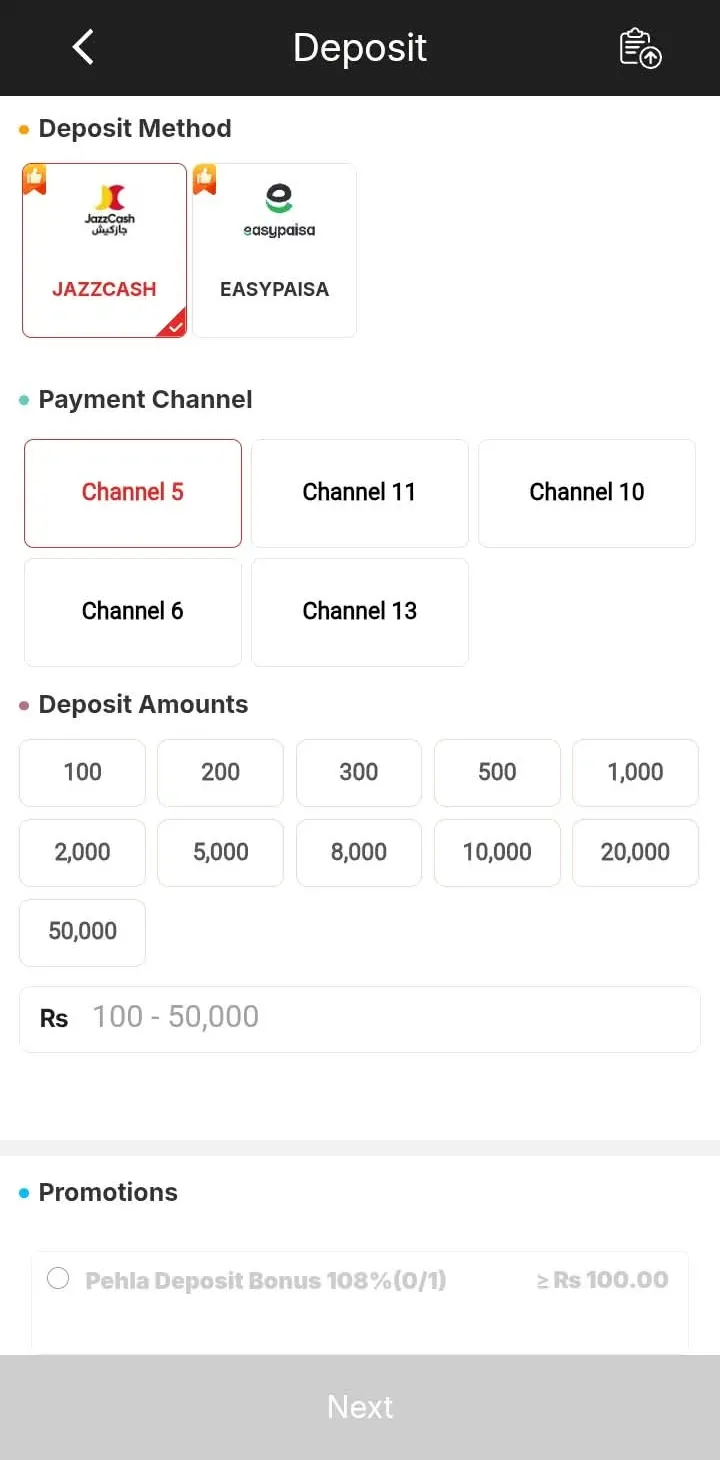
| Minimum deposit | 100 PKR | Methods: Easypaisa and JazzCash |
| Maximum deposit | Around 100,000 PKR or higher | Check the current limit shown in your account |
| Deposit processing | Around 10 seconds to 1 minute | Timing can vary |
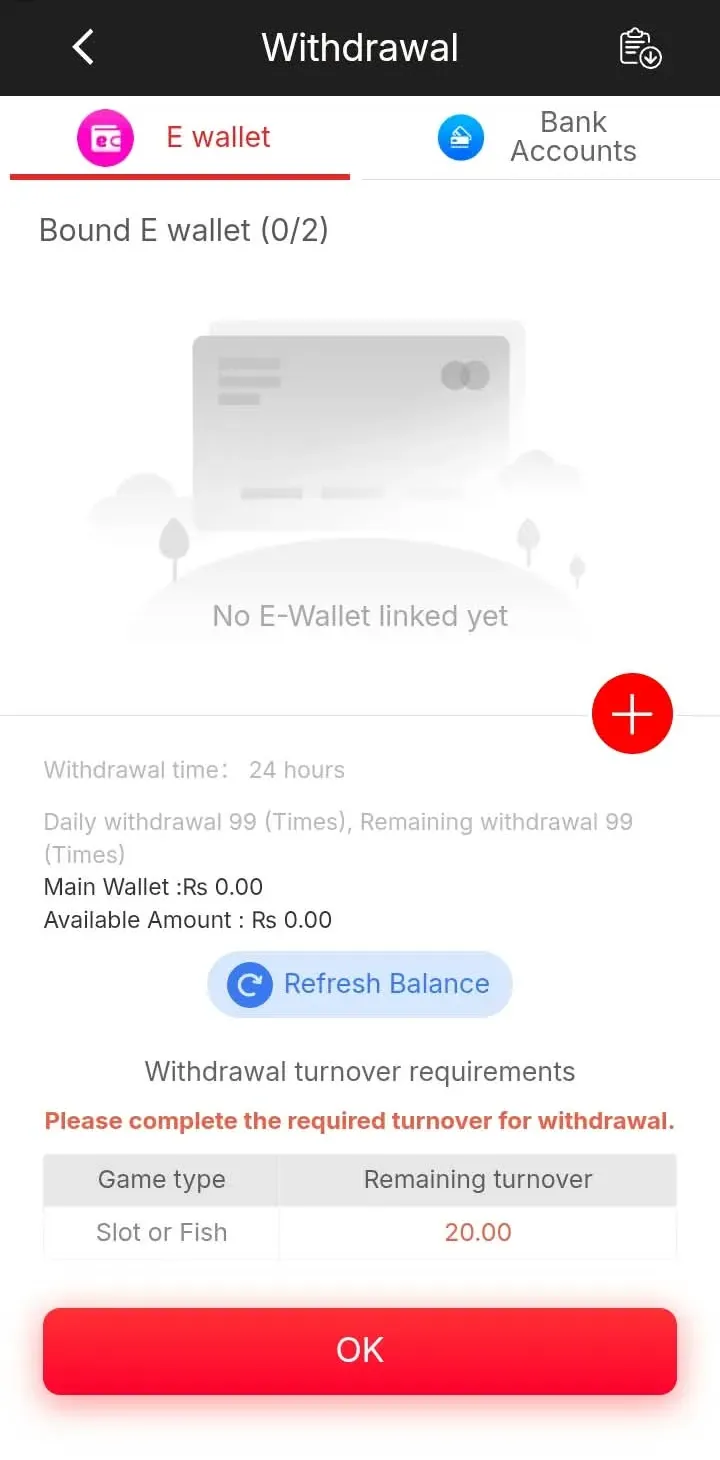
| Minimum withdrawal | 100 PKR | — |
| Maximum withdrawal | 50,000 PKR per request | Applies to one request, not a daily limit |
| Normal withdrawal | Around 1–20 minutes | Timing can vary |
| Maintenance delay | Around 20 minutes to 1–2 hours | During mobile-wallet maintenance |
The limit shown inside your own deposit or withdrawal section is the one that applies to you, so treat it as final.
How to Make a ClubPK Deposit
You need to be logged in first. If you do not have an account yet, follow our ClubPK Login and registration guide.
- Open the ClubPK app and sign in to your account.
- Go to the Deposit section.
- Choose an available payment method: Easypaisa or JazzCash.
- Read the payment details shown in your account carefully.
- Enter the amount you want to deposit.
- Complete the payment from your mobile wallet.
- Enter any transaction or reference details the form asks for, then confirm.
The exact buttons or fields may vary slightly depending on the current version of the app.
ClubPK Deposit with Easypaisa or JazzCash
Easypaisa and JazzCash are the mobile-wallet options available for deposits. Keep these habits in mind:
- Use only the details in your own account. An old screenshot or details forwarded on WhatsApp may point to the wrong place.
- Check twice before you send. Match the amount and reference information with what your account shows.
- Save your receipt. Keep the wallet confirmation screenshot until your balance updates.
- Keep your wallet details private. Never share your PIN, password, OTP or verification code, even with someone claiming to be from ClubPK.
How Long Does a ClubPK Deposit Take?
A deposit is normally credited in around 10 seconds to 1 minute, but this is not a promise for every payment. It can take longer because of a slowdown on the payment network, incorrect reference details, a temporary technical problem or wallet maintenance.
What to Do If Your ClubPK Deposit Is Pending
- Check the deposit's status in your transaction history.
- See whether your balance has already updated.
- Confirm the amount and reference number are correct.
- Keep your payment receipt ready.
Do not send a second payment just because the first one is slow, as this makes the problem harder to sort out. If the deposit stays pending well past the normal time, contact ClubPK support with the details listed in the support section below.
How to Make a ClubPK Withdrawal
- Open the ClubPK app and sign in.
- Go to the Withdrawal section.
- Check your available balance.
- Enter the amount you want to withdraw.
- Select or enter the payment details the form asks for.
- Review the amount and payment details carefully.
- Submit the request and follow its status in your transaction history.
If you accepted a bonus, check that its conditions are complete before withdrawing. Our ClubPK Bonuses page explains how bonus terms work. If your app is out of date, get the current version from the ClubPK APK Download page.
ClubPK Withdrawal Limits
The minimum ClubPK withdrawal is 100 PKR. The maximum for a single withdrawal request is 50,000 PKR.
This 50,000 PKR figure applies to one request only. It is not a daily limit. You can submit more than one withdrawal request in a day, subject to the platform's rules and processing.
How Long Does a ClubPK Withdrawal Take?
Most withdrawals are processed in around 1–20 minutes. During Easypaisa, JazzCash or other mobile-wallet maintenance, a withdrawal can take around 20 minutes to 1–2 hours. Because timing depends partly on outside networks, it is not guaranteed. Check the status in your transaction history before contacting support, because the request may already be complete.
Easypaisa and JazzCash Maintenance Delays
Wallet providers sometimes carry out maintenance, and payments to wallets can slow down during that time. A delay like this does not automatically mean your withdrawal has failed. The request is usually waiting for the network to return to normal. If it stays pending beyond the maintenance range above, contact ClubPK support.
What If My ClubPK Withdrawal Is Pending?
Check the status in your transaction history and confirm your payment details are correct. Remember that wallet maintenance can slow things down. Do not submit the same withdrawal again and again. If it is still pending after the expected time, contact support.
What If My Withdrawal Fails?
A withdrawal can fail because of:
- Incorrect payment information
- Temporary payment maintenance
- A transaction processing issue
- Account details that need correcting
- Another problem on the platform side
Check your details first, then contact support with the transaction information.
Can a ClubPK Deposit or Withdrawal Get My Wallet Banned?
A normal deposit or withdrawal does not automatically mean your mobile wallet or ClubPK account will be banned.
Still, you should play your part:
- Use only your own, legitimate payment details.
- Avoid suspicious or unauthorised transactions.
- Never share your account or wallet login details.
- Follow your payment provider's rules.
If your wallet provider restricts your wallet, contact that provider directly. For a ClubPK account or transaction issue, contact ClubPK support.
ClubPK Support for Deposit & Withdrawal Problems
The ClubPK support team can help with payment issues, and its agents are described as responsive. Reach out when:
- A deposit or withdrawal stays pending
- A withdrawal fails
- You entered incorrect transaction details
- A completed payment has not reached your balance
- You do not understand a transaction status
Before you message support, prepare:
- Transaction or reference number
- Amount
- Payment method
- Date and time
- Screenshot or receipt, where useful
- A short explanation of the problem
Official support channel: Live chat support inside the ClubPK app. Tap Services on the app's home screen.
Common ClubPK Payment Mistakes
- Paying to an old number or account. Copy details fresh from your account.
- Typing the wrong amount or reference number. Copy both straight from your wallet receipt.
- Not keeping a receipt. Without proof, a stuck payment is harder to trace.
- Submitting the same request repeatedly. This creates confusing records.
- Using someone else's payment details. This makes tracing harder.
- Sharing your OTP, PIN or password. Nobody genuine needs these.
- Trusting "agents" or social-media instructions. Follow only what your own account shows.
Payment Security Tips
Never share your ClubPK password, any OTP or verification code, or your Easypaisa or JazzCash PIN. Do not send money to anyone who contacts you privately claiming to be support. Check your account before every payment, keep your receipts, avoid modified APK files and use a unique password.
Responsible Gaming
Only deposit money you can afford to lose. Never use money meant for bills, rent or household needs. Set a personal spending limit, take regular breaks and do not chase losses. Gaming is entertainment, not a guaranteed source of income.
Frequently Asked Questions
What is the minimum deposit amount on ClubPK?
You can deposit from 100 PKR, and the upper limit depends on what your account shows.
Can I deposit on ClubPK using Easypaisa or JazzCash?
Yes. Use the payment details displayed inside your own account.
How long does a ClubPK deposit normally take to reach my balance?
Usually around 10 seconds to 1 minute, though it can sometimes take longer.
What should I do if my ClubPK deposit is still pending?
Confirm the amount and reference number, then send support your receipt and transaction details.
What is the minimum amount I can withdraw from ClubPK?
The minimum withdrawal is 100 PKR.
What is the maximum amount I can withdraw in one ClubPK request?
One request can be up to 50,000 PKR. This is a per-request limit, not a daily limit.
How long does a ClubPK withdrawal normally take?
Most withdrawals take around 1–20 minutes, but timing is not guaranteed.
Why can a withdrawal take longer during mobile-wallet maintenance?
Wallet maintenance slows payments down, so a withdrawal may take around 20 minutes to 1–2 hours.
What should I do if my ClubPK withdrawal fails or stays pending?
Recheck your payment details and avoid resubmitting the same request. Then contact support with your transaction information.
Who should I contact if I have a ClubPK payment problem?
Contact ClubPK support through official channels. For a wallet restriction, contact your wallet provider.
Conclusion
The ClubPK Deposit & Withdrawal process is simple once you know the key numbers. Deposits start at 100 PKR and usually arrive within a minute. Withdrawals start at 100 PKR, go up to 50,000 PKR per request and normally arrive within 20 minutes, though wallet maintenance can add time. Use only the payment details in your own account, keep your receipts and contact ClubPK support with your transaction details if anything goes wrong.