
This page helps you create a ClubPK account, log in, recover a forgotten password and keep your login details safe from common security mistakes.
For games, rewards and payments, see our ClubPK guide.
How to Register on ClubPK
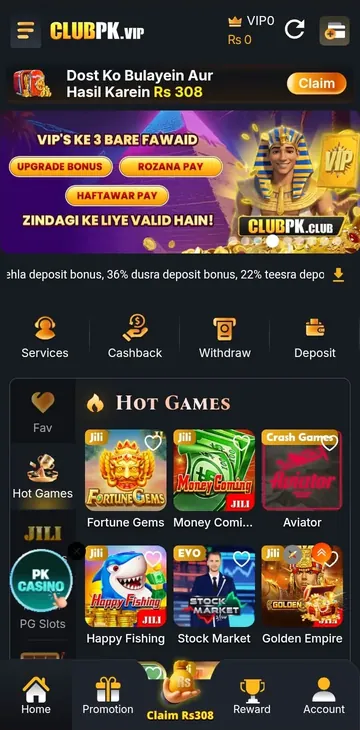
- Open the ClubPK app or the official ClubPK website.
- Select Register.
- Enter the information the registration form asks for.
- Create a strong password that you do not use anywhere else.
- Complete any verification step shown by the platform, if required.
- Review your details and submit the form.
Do not have the app yet? Get it from the ClubPK APK Download page first.
Registration requirements: Minimum age 18. One account per mobile number. All information must be accurate — false details may result in account suspension.
How to Login to ClubPK
- Open the ClubPK app or the official ClubPK website.
- Select Login.
- Enter your account details.
- Enter your password.
- Complete any verification the platform asks for, if required.
- Select Login to open your account.
If login fails, see the login problems section below. If nothing works, contact support through official ClubPK channels.
Official support channel: Live chat support inside the ClubPK app. Tap Services on the app's home screen.
Forgot Your ClubPK Password?
If a password recovery option is available on the login screen, select it and follow the instructions. The available recovery options may vary, so follow the instructions shown on the official login screen.
Once you are back in, create a new, unique password rather than reusing an old one.
Recovery method: Minimum age 18. One account per mobile number. All information must be accurate — false details may result in account suspension.
How to Keep Your ClubPK Account Secure
Never Share Your Password
Do not give your password to friends, strangers, agents, people claiming to be support staff, or anyone contacting you on social media. Genuine support should not need it.
Never Share Verification Codes
If ClubPK sends you a verification code, treat it like your password. Never share an OTP, login code or reset code with anyone.
Use a Unique Password
Choose a password that is hard to guess and used only for ClubPK, not for your email, banking or social media. Avoid your name, birthday, phone number or simple patterns such as "123456."
Do Not Save Passwords on Public Devices
Cyber cafés, shared computers and friends' phones may store your login details. Do not save your password there.
Check the Website Address
Before entering your password, verification code or personal details, check the website address carefully. Copied websites can look almost identical to the real one.
Avoid Suspicious Links
Be careful with login links sent through WhatsApp, Telegram, Facebook, unknown messages or unverified social media accounts. Not every link is harmful, but typing the address yourself is safer.
Avoid Modified APK Files
Modded, cracked or "unlimited coins" APKs can put your account at risk. Use the official download source whenever possible.
Log Out When Needed
Always log out on shared devices, or on your own phone if others use it.
Keep Your Phone Secure
Use a screen lock, keep your phone's operating system updated and use security software where applicable.
Common Login and Account Security Risks
| Problem | What It Can Lead To | What To Do |
|---|---|---|
| Shared password | May allow unauthorised account access | Change the password immediately |
| Shared verification code | Creates an account takeover risk | Never share codes with anyone |
| Fake login page | Can expose your login details | Check the website address |
| Reused password | Other accounts may be exposed | Use a unique password |
| Modified APK | Creates a security and privacy risk | Use a trusted APK source |
| Public device login | Saved details may allow access | Log out and do not save the password |
Common Registration Problems
Registration Form Does Not Submit
Check that every required field is filled in correctly.
Verification Does Not Work
Follow the current on-screen instructions and try again.
Password Is Rejected
Create a stronger password that meets the requirements shown.
Account Already Exists
Do not keep creating new accounts. Use login or recovery instead.
Registration Page Is Not Loading
Check your internet connection and try again later.
Common ClubPK Login Problems
- Incorrect password: Check for typing errors and Caps Lock.
- Incorrect account details: Use the details from registration.
- Forgotten password: Use the recovery option if available.
- Verification issue: Follow the on-screen instructions carefully.
- App version issue: Update to the latest version from the official source.
- Internet connection: Switch between Wi-Fi and mobile data.
- Temporary service issue: Wait a little and try again.
What to Do If You Lose Access to Your Account
- Stop trying random passwords again and again.
- Use the official recovery option if available.
- Follow the verification instructions shown.
- Change your password once you are back in.
- Review your account activity if the platform shows it.
- Contact official support if recovery does not work.
Never send your password to anyone, including support.
How to Spot Fake ClubPK Support Messages
A message may be a phishing attempt if someone:
- Asks for your password.
- Asks for an OTP or verification code.
- Asks you to click an unknown login link.
- Promises special account access.
- Asks for payment to "unlock" your account.
- Sends you a modified APK.
- Pressures you to act immediately.
Verify support only through the official website or account channels.
Responsible Account Use
Gaming is entertainment, not guaranteed income. Keep spending within a personal limit, do not borrow money to play and do not chase losses. If gaming starts affecting your daily life, take a break.
Frequently Asked Questions
How do I register for a ClubPK account?
Select Register, fill in the requested details, create a unique password and complete any verification shown.
How do I login to ClubPK?
Select Login, enter your details and password, and complete any verification requested.
What should I do if I forget my ClubPK password?
Use the recovery option on the login screen, if available, then set a new, unique password.
Should I share my ClubPK password with anyone?
No. Nobody, including support staff, should need your password.
Should I share my OTP or verification code?
No. A verification code can give someone access to your account.
Can I use the same password for ClubPK and my email account?
No. If one account is exposed, the other is put at risk too.
What should I do if I entered my password on a suspicious website?
Change your ClubPK password right away through the official app or website, and anywhere else you used it.
How can I protect my ClubPK account on a shared phone?
Do not save your password, and log out completely after every session.
What should I do if someone asks for my ClubPK password?
Do not share it. Treat the request as a possible phishing attempt.
Why is my ClubPK login not working?
Check your details, password, connection and app version, then try password recovery.